Enterprise Cloud Strategy: How to Integrate Zero Trust and Compliance
Developing an enterprise cloud strategy that integrates Zero Trust and compliance ensures secure, policy-driven access to data across distributed environments. By embedding least privilege principles, continuous verification, and regulatory alignment into cloud architecture, organizations can mitigate risk while enabling scalable collaboration. This approach is essential for enterprises operating in highly regulated or security-sensitive sectors.
Step 1: Assess Your Current State
Begin with a clear understanding of where your organization stands. Audit your existing infrastructure – what systems are cloud-based, which are still on-premises, and how are they integrated? Evaluate gaps in data security, compliance readiness, and access control. Engage stakeholders across IT, compliance, and business units to understand requirements and pain points. This step sets the stage for a realistic and aligned cloud strategy.
Step 2: Define Your Cloud Architecture
Choosing the right cloud model is critical. Public clouds offer flexibility and cost-efficiency, but may fall short on data sovereignty needs. Private clouds deliver more control but can be costly to maintain. Hybrid and multi-cloud environments provide a balanced approach, offering redundancy, workload portability, and vendor diversification. Align your selection with operational, legal, and performance requirements.

FileCloud offers on-prem, cloud, and hybrid deployment options.
Step 3: Establish Data Classification & Governance
Every effective strategy begins with knowing your data. Implement a classification framework that segments data based on sensitivity – public, internal, confidential, regulated. Define data retention policies, access privileges, and data handling rules accordingly. Utilize metadata and tagging systems to enforce these policies consistently and auditably across your cloud infrastructure.
Step 4: Embed Zero Trust Principles
Zero Trust assumes that no user or system is inherently trusted, even inside the network perimeter. Enforce strict identity verification, use multi-factor authentication (MFA), and segment access based on roles and context. Encrypt files at rest and in transit, and avoid storing decryption keys with the files. This drastically reduces your exposure in case of a breach and ensures fine-grained control over every file action.
Step 5: Align with Compliance Frameworks
Regulations like GDPR, HIPAA, and CMMC require precise control over data access, retention, and movement. Map your storage approach to each applicable regulation by ensuring audit logging, data residency, and user consent protocols. Choose cloud platforms that provide compliance templates, reporting tools, and third-party certifications to streamline audit prep and legal adherence.
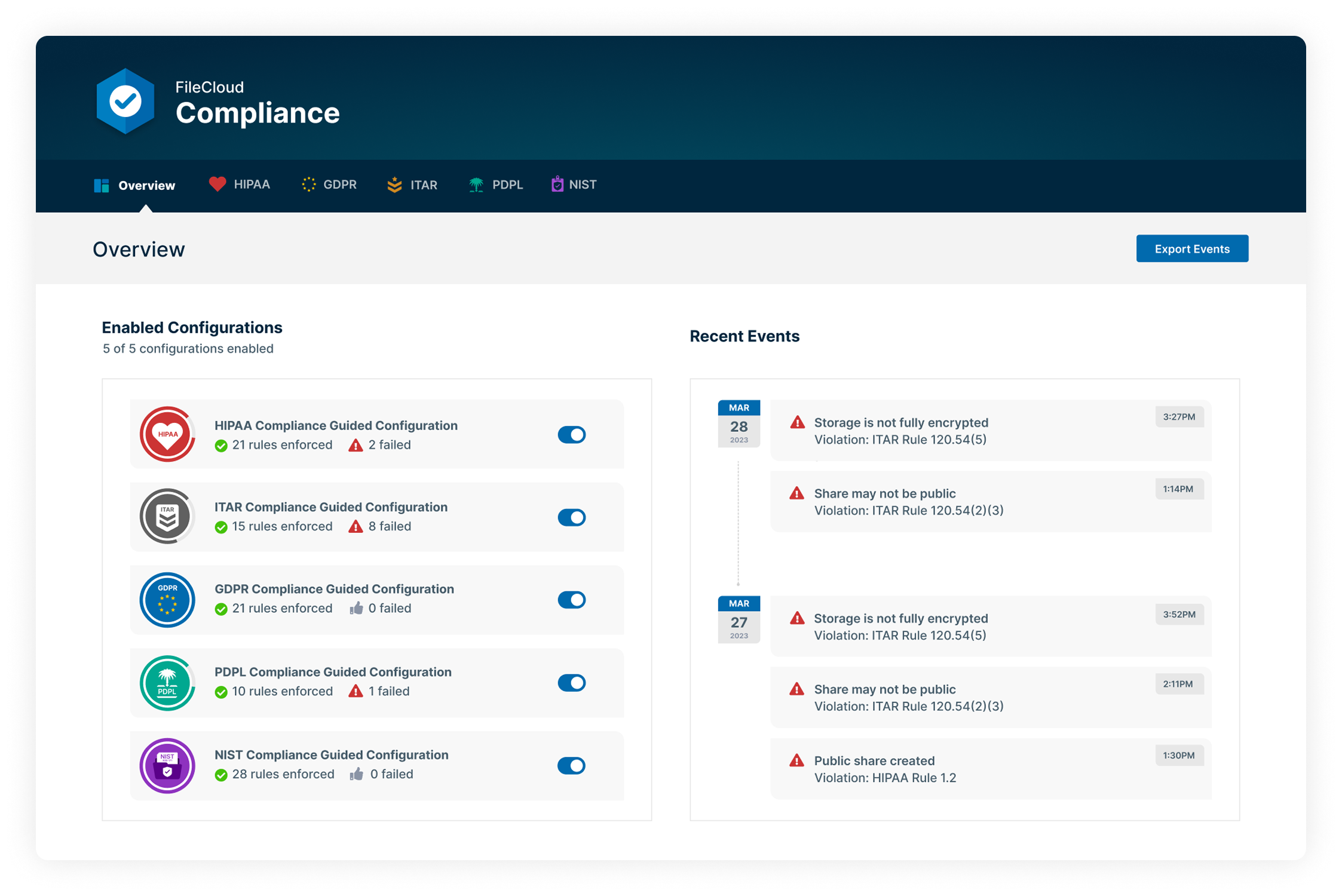
FileCloud Enterprise Advanced offers a built-in Compliance Center to connect compliance requirements with FileCloud capabilities.
Step 6: Plan for Secure Collaboration and Access
A modern cloud strategy must enable seamless, secure access for both internal and external users. Prioritize platforms that offer guest access, time-bound links, and detailed sharing permissions. Remote access should be intuitive, with support for desktop, mobile, and offline access, and protected by encryption and policy controls. This supports productivity without compromising governance.
Step 7: Leverage Automation & Intelligence
Automate wherever possible to reduce human error and streamline operations. Use intelligent metadata to auto-classify files upon upload. Build workflows for approval, notification, or escalation. Enable anomaly detection and set up alerts for policy violations. These capabilities improve both efficiency and compliance posture, while minimizing manual overhead.
Step 8: Ensure Scalability and Integration
Your cloud storage should grow with your business. Look for solutions that support elastic scaling, whether hosted on-prem, in the cloud, or in a sovereign region. Integration with identity providers (like AD, SSO), business applications (CRM, ERP), and security tools (DLP, SIEM) ensures your storage infrastructure fits seamlessly into your existing ecosystem.
Step 9: Monitor, Measure, and Optimize
Establish clear metrics to measure the success of your strategy-storage utilization, collaboration adoption, compliance status, and access control coverage. Regularly review audit logs, identify stale data, and rotate credentials and encryption keys. Use these insights to fine-tune policies, improve user training, and reduce risk over time.

FileCloud audit logs are comprehensive, immutable, and exportable, supporting admins with system monitoring and control.
Accelerate Your Cloud Strategy with FileCloud
FileCloud offers a secure, scalable cloud solution designed for enterprises. Its core capabilities such as Zero Trust File Sharing®, on-premises and hybrid deployment models, workflow automation, and extensive compliance controls provide the foundation for regulated collaboration and data governance.
To discover how FileCloud supports strategic cloud storage initiatives, sign up for a free trial or request a personalized demo.

Product Marketing Manager