Extending a Trusted Collaboration Model with Shared Network Folders
For decades, the shared network folder has been a foundation of business collaboration. It gives employees a familiar place to store documents, work with colleagues, and access departmental resources without emailing files back and forth.
The model remains valuable because it is straightforward. Users open Windows File Explorer, select a mapped drive, and navigate a structure they already understand. Administrators can centralize storage, manage access through directory groups, and keep business data within infrastructure controlled by the organization.
However, today’s collaboration requirements extend far beyond the office network. Employees work remotely, external partners need controlled access, and security teams must apply policies such as data loss prevention, content classification, retention, and malware scanning.
The challenge is not necessarily replacing every shared network folder. It is finding a secure way to extend the value of existing network storage while addressing its operational and governance limitations.
Why Shared Network Folders Remain Important
A shared network folder provides a central location that multiple authorized users can access over a local network. In Windows environments, permissions are often managed using Active Directory groups and NTFS access controls.
For IT teams, this model offers several practical benefits:
- Centralized control over business files
- Familiar access through Windows File Explorer
- Group-based permissions and authentication
- Storage within organization-controlled infrastructure
- Support for established departmental workflows
- Reduced dependence on local device storage
This familiarity matters. A finance team may have years of records organized within a mapped drive. An engineering group may depend on a carefully designed folder hierarchy. A service provider may maintain separate shares for different customers.
Moving all that content into an entirely new system can introduce migration risk, retraining requirements, permission problems, and business disruption. In many cases, extending existing network file sharing is more practical than replacing it outright.
Where Traditional Network File Sharing Creates Friction
Shared folders work well inside a controlled local network. Problems often appear when collaboration must extend beyond that environment.
Remote users may rely on a VPN to access files. VPN connections can create support issues, inconsistent performance, and a poor experience when employees need to retrieve large documents from outside the office.
External sharing creates another challenge. A traditional network share is generally designed for internal users with access to the corporate network. When a client, contractor, or business partner needs a file, employees may work around the limitation by sending an email attachment or uploading the document to an unauthorized consumer service. These workarounds reduce IT visibility and increase the risk of uncontrolled copies.
Administrators may also struggle to answer basic governance questions, such as:
- Who accessed a sensitive document?
- Was a file downloaded or shared externally?
- Does the folder contain regulated or confidential data?
- Are retention requirements being applied consistently?
- Has malware been introduced into the share?
- Are users keeping duplicate or outdated versions elsewhere?
A shared network folder can centralize storage, but storage centralization alone does not provide a complete content governance strategy.
Security Depends on More Than Folder Permissions
Folder permissions are essential, but they address only one part of the security problem.
An administrator may configure access so that only a specific department can open a folder. That control does not necessarily protect a file after an authorized user downloads it, emails it to someone else, or copies it to another system.
Modern security programs must consider the full content lifecycle. This includes identity, access, classification, sharing, retention, monitoring, and eventual disposition.
IT teams therefore need capabilities such as:
- Granular internal and external sharing controls
- Password-protected or expiring share links
- Detailed audit trails
- Data loss prevention rules
- Antivirus and content disarm and reconstruction
- Metadata and content classification
- Retention and legal-hold policies
- Workflow automation
- Reporting for security and compliance teams
Applying these capabilities directly to established Windows network folders has historically been difficult. Many organizations have had to choose between preserving familiar file-server workflows and moving content into a separate collaboration platform. A better approach? Connect the two.
Extending Network Folders with FileCloud
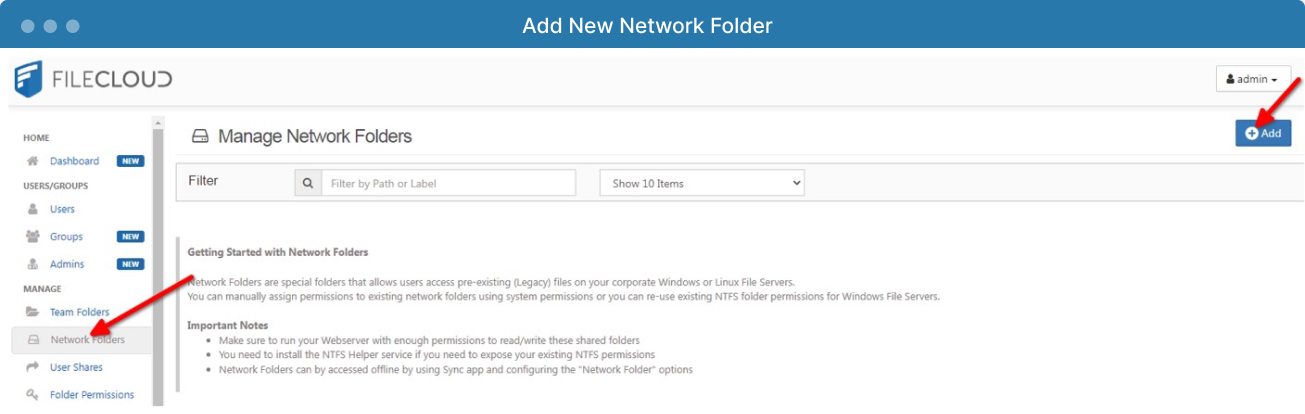
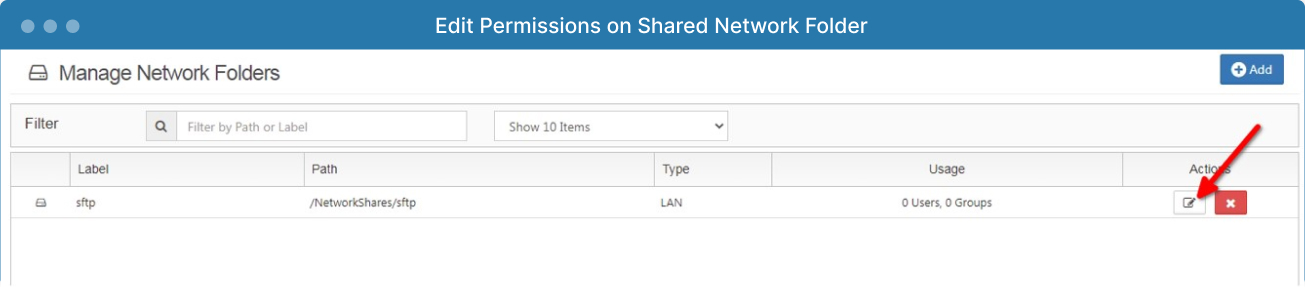
FileCloud can make existing organizational network shares available through a secure content collaboration environment. Administrators can configure LAN-based Network Folders and make authorized content accessible through FileCloud interfaces, including supported web and mobile access.
This allows an organization to retain its existing folder structure and storage strategy while providing users with more flexible ways to access and share content.
Instead of exposing the file server directly or requiring every external collaborator to connect to the corporate network, IT can provide controlled access through FileCloud. Existing identity systems and permissions can remain central to the deployment, reducing the need to recreate complex access structures.
Users who need local copies can also use FileCloud synchronization capabilities. FileCloud clients like Sync and Desktop make selected FileCloud content available through Windows Explorer or macOS Finder and synchronizes changes between local and server-based copies.
This model gives IT teams flexibility. They can continue supporting familiar Windows network folders while adding secure remote access, controlled sharing, mobile availability, auditing, and governance through a broader collaboration platform.

FileCloud Desktop User Interface
What Is the FileCloud Network Share Scanner?
The FileCloud Network Share Scanner, also referred to as NSS, is designed to improve how FileCloud detects and processes changes within LAN-based Network Folders.
Network Share Scanner is currently a beta feature. Organizations should evaluate its suitability and testing requirements before considering it for production workflows.
Traditional indexing methods may need to scan large folder structures repeatedly to identify additions, modifications, or deletions. This can become inefficient when an organization manages millions of files or highly active network shares.
The Network Share Scanner takes an event-driven approach. It monitors file system events on configured LAN-based Network Folders so FileCloud can respond more efficiently when content changes.
NSS was initially introduced in FileCloud 23.251.1 as a command-line beta capability. FileCloud 23.261 added the ability to run and manage Network Share Scanner services through the FileCloud Control Panel.
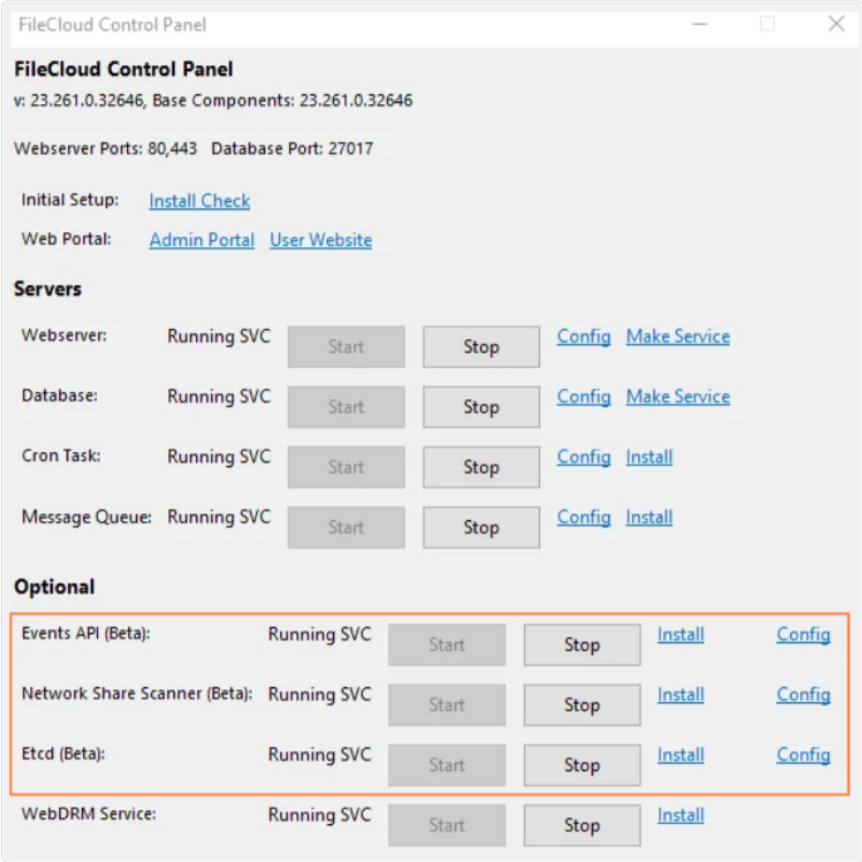
Once configured, the beta scanner can help make advanced FileCloud capabilities available for files stored within supported network folders.
These capabilities include:
This is an important distinction. A network share scan is not simply an inventory of filenames. The goal is to help FileCloud recognize file-system activity and apply security, automation, and governance functions to content that remains in existing network storage.
A Practical Path Forward for Network File Sharing
Shared network folders are not obsolete. They continue to offer centralized control, predictable access, and compatibility with deeply established business processes.
Their limitations become more visible when organizations need to support remote work, external collaboration, detailed auditing, and policy-based governance. At that point, adding more VPN capacity or creating additional mapped drives does not solve the underlying content management problem.
FileCloud offers a way to build on the network file sharing model rather than immediately abandoning it. Organizations can integrate existing network folders with a secure collaboration platform, provide controlled access across devices, and introduce stronger sharing and governance capabilities.
The beta Network Share Scanner represents another step in that direction. By monitoring supported file-system events and connecting network-folder content with advanced FileCloud services, NSS may help IT teams manage established storage environments more efficiently.
The best strategy is not always to replace the shared network folder. Sometimes, it is to preserve what already works while adding the visibility, control, and security that modern collaboration requires.
Want to explore how FileCloud can support secure network file sharing?
Sign up for a free trial or schedule a demo!
Frequently Asked Questions
What is a shared network folder?
A shared network folder is a central location on a local network that multiple authorized users can access, typically through a mapped drive in Windows File Explorer. Access is usually governed by Active Directory groups and NTFS permissions, letting administrators centralize storage within organization-controlled infrastructure.
Are shared network folders still relevant?
Yes. Shared network folders still offer centralized control, predictable access, and compatibility with established business processes. Their limitations surface when organizations need remote work support, external collaboration, detailed auditing, or policy-based governance—challenges best addressed by extending the folder model rather than replacing it outright.
Is network file sharing safe?
Folder permissions alone don’t guarantee safety—they don’t protect a file once it’s downloaded, emailed, or copied elsewhere. True security requires addressing the full content lifecycle: access controls, sharing restrictions, audit trails, data loss prevention, malware scanning, and retention policies working together.
How do I know who is accessing my shared network files?
Folder permissions alone don’t answer this. Organizations need detailed audit trails that track who accessed a document, whether it was downloaded or shared externally, and whether retention requirements are being applied consistently—capabilities that go beyond basic Active Directory and NTFS controls.
What is the FileCloud Network Share Scanner?
The FileCloud Network Share Scanner (NSS) is a beta feature that uses an event-driven approach to detect changes in LAN-based Network Folders, monitoring file system events rather than repeatedly scanning entire structures—improving efficiency for organizations managing millions of files or highly active shares.

Product Marketing Manager