Security & Collaboration For Diversified Banks

Streamline Operations and Strengthen Data Governance

Try Free Now
Client Logo
Client Logo
Client Logo
Client Logo
Client Logo
Client Logo

Time-Consuming and Insecure File Sharing

IT managers in the diversified banks industry face the challenge of secure file sharing and collaboration. Traditional methods are time-consuming and lack the necessary security measures, putting sensitive data at risk.

Don't Compromise on Security

With cyber threats on the rise, compromising on security is not an option. IT managers need a solution that ensures top-tier compliance and safeguards data while enhancing collaboration and productivity.

FileCloud - The Ultra-Secure File Sharing Platform

FileCloud is an industry-leading secure file sharing & collaboration platform tailored specifically to the needs of IT managers in the diversified banks industry. With advanced compliance features, data governance capabilities, and best-in-class security, FileCloud eliminates the risks associated with traditional file sharing methods.

Gartner Per Insights Logo 2018
Gartner Per Insights Logo 2019
Gartner Per Insights Logo 2020
Gartner Per Insights Logo 2021
Gartner Per Insights Logo 2022

FileCloud has received the Gartner Peer Insights Customers’ Choice Distinction for the fifth consecutive time!

92% of our customers would recommend us to a friend.

Rating Stars Image 4.6

Access Files Anywhere:

Easily access files from any web browser or mobile device (iOS, Android). Stay productive on the go without worrying about data security.
FileCloud offers seamless, secure access to your work files and folders from anywhere, at any time. Whether you’re using a web browser on your desktop or our mobile app on iOS and Android, you have instant access to your files. Built-in file preview helps you check document contents without needing to download, helping you save time and bandwidth.

Remote File Access

Advanced File Sharing Controls:

Control who can view, download, upload, share, sync, delete and manage your files.
With FileCloud, you can set granular permissions, restrict shares to view-only, limit uploads or downloads, disable unwanted sharing and deletion, and manage shares even after sending. You also have the option to set shares as public or private, with the ability to place time limits on share links, ensuring that your data remains under your control.
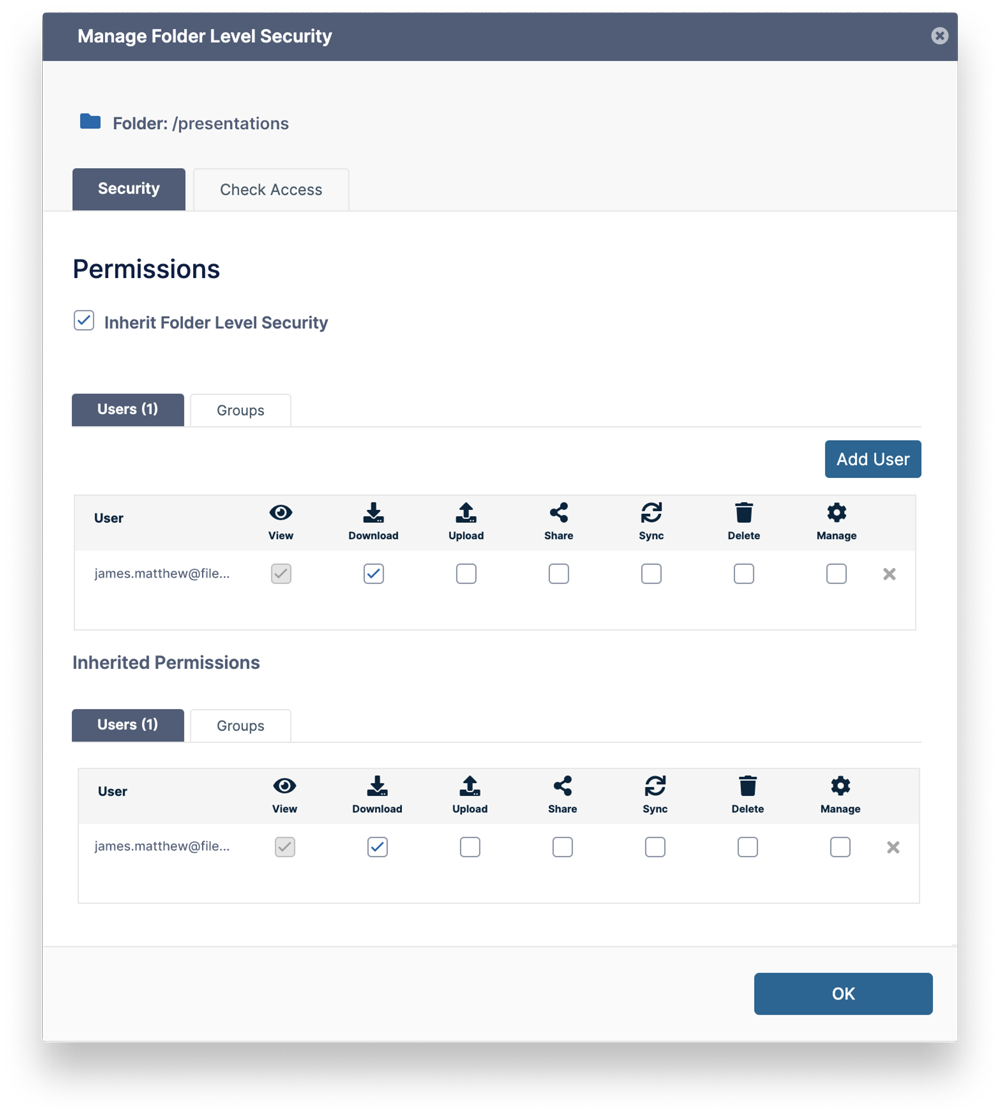
Advanced File Sharing
 

Unified Collaboration:

Boost productivity with a shared workspace for your teams.
With features like team folders, file sharing, requests, commenting, tagging, and notifications, FileCloud supports streamlined collaboration. You can even co-author documents in real-time using Microsoft Office and Google Docs, making it easier for your teams to work together.

Top-tier Compliance:

Stay compliant with industry regulations.
FileCloud’s Compliance Center offers advanced compliance features with different tabs for GDPR, HIPAA, NIST 800-171 and more. Additionally, FileCloud provides audit trails, integrated compliance reports, encryption, two-factor authentication, and ransomware protection. Plus, with FileCloud you can keep your data in the region of your choice to comply with regulations.

FAQs

1. What devices can I access FileCloud from?
You can access FileCloud from web browsers and mobile devices (iOS, Android). We also provide desktop clients for Windows, Mac, and Linux.

2. How does FileCloud enhance collaboration?
FileCloud features like team folders, commenting, tagging, notifications, and real-time co-authoring using Microsoft Office and Google Docs make collaboration seamless and efficient.

3. Is FileCloud compliant with industry regulations?
FileCloud’s Compliance Center helps aid compliance with many different regulations such as GDPR, HIPAA, and ITAR. Additionally, FileCloud provides audit trails and integrated compliance reports, encryption, two-factor authentication, and ransomware protection.

4. Can I control who can view, download, upload, share, and manage my files in FileCloud?
Yes. FileCloud allows you to set granular permissions that let you control who can view, download, upload, share, sync, delete and manage your files.

5. Can FileCloud be hosted in the region of my choice?
Yes. With FileCloud, you can host your data in the region of your choice for better performance and to comply with regulatory requirements.

Worldwide

FileCloud
CodeLathe Technologies Inc.
dba FileCloud
125 Park Avenue FL 25
New York, NY 10017-5550

Fax: +1 (866) 824-9584

Europe

FileCloud Technologies Limited
Ducart Suite,
Castletroy Park Commercial Centre, Castletroy,
Limerick, Ireland


Copyright © FileCloud. All Rights Reserved.

Please select your country

SUBMIT