Government File Sharing & Storage Solution with Flexible Deployment Options
Government agencies handle a vast array of confidential data, including citizen records, defense strategies, financial transactions, and inter-agency communications.
Secure file sharing and transfer solutions for government agencies prioritize data protection, compliance and control. These platforms ensure sensitive information can be securely shared and managed, maintaining confidentiality and supporting seamless communication across agencies. Secure file transfer is essential for government operations to protect sensitive information, maintain public trust, and ensure national security.
FileCloud is a hyper-secure file management, collaboration, and storage platform that can be deployed as an on-premises, cloud, or hybrid solution.
• FileCloud FedRAMP High provides an authorized cloud option for U.S. federal agencies handling highly sensitive information.
• FileCloud Server can be deployed on-prem or as a hybrid configuration for a self-hosted solution.
With tools to ensure government institutions maintain control over their data and comply with cybersecurity regulations, FileCloud meets diverse government needs for performance, latency, disaster recovery, digital transformation, and security.
Secure File Transfer & Zero Trust Collaboration for Government Organizations
FileCloud is a hyper-secure platform for file sharing, storage, sync, and real-time collaboration. Powerful authentication, permissions validation, and audit tools help governments launch a robust and dynamic Zero Trust strategy to protect their sensitive and mission-critical data.
There are several options to share or transfer files with FileCloud while maintaining security:
• Users can share files from their personal “My Files” storage or Team Folders. Any new uploads are first scanned by built-in antivirus software (preferred antivirus can also be integrated with FileCloud).
• Shares can be sent as public or private – if sent via public share link, users can also set a password, set an expiration date, and even limit permissions (e.g., view-only).
• Private shares can be set up for specific users or groups within the FileCloud environment, with granular access controls and file permissions.
• Users can easily collaborate on files with real-time editing through Microsoft and Google Docs integrations.
• Files can be locked or unlocked and unlimited file versioning ensures that data is never lost.
Zero Trust File Sharing
For even greater security, users can leverage FileCloud’s industry-first Zero Trust File Sharing®. By adding sensitive or confidential files to a ZIP folder in FileCloud and setting a password, the container becomes a Zero Trust folder that can only be read by authorized users with the password. This folder can be shared much like any other folder in FileCloud, but the contents of the folder are separately encrypted and secured in the event of a data breach.

Secure External File Sharing
Government institutions and agencies often interface with external contractors or non-profit organizations to deploy public services. FileCloud offers a secure platform from which to extend file sharing, without needing to create complicated permissions hierarchies or expend licenses on external users.
With unlimited external accounts, government organizations can share information with contractors, vendors, suppliers, subject matter experts, and other stakeholders. These external accounts do not count toward the license limit, which means that data stays safe within the FileCloud environment while supporting streamlined collaboration.
FileCloud also supports file request and upload portals, in which external collaborators can easily submit information without ever seeing any of the preexisting data stored on the platform.
Learn about secure file sharing software for safe, encrypted collaboration!
Data Visibility, Governance, & Compliance
Governments handle extensive data that may go back decades. With the increasing volume and velocity of data, admins are pressed with the task of both organizing and controlling that data. Furthermore, this data is often confidential and sensitive. Admins in FileCloud can create policies that restrict how files and folders are accessed, deleted, or edited, which helps ensure data security and integrity, while also meeting specific regulatory requirements.
Metadata, Classification, and DLP
To support data visibility, FileCloud admins can apply metadata tagging with default, built-in, or customized metadata sets. This metadata supports pattern searches for data such as personally identifiable information (PII), protected health information (PHI), financial account records, and more.
Metadata is the backbone for content classification in FileCloud, which can be leveraged to support governance policies. With FileCloud’s Smart Classification, metadata tagging can be done automatically, alleviating a significant admin responsibility and reducing clerical oversights.
Data leak prevention (DLP) controls user shares and prevents accidental data leaks. Admins can create DLP rules that deny (or permit with notification) file sharing based on file attributes, such as file type, user, location, metadata, device, or IP address (among others). DLP can also be automated by building rules based on FileCloud’s Smart Content Classification system.
Retention Policies
Retention policies are especially important for government institutions, since these public bodies often work on public projects or support civilian populations, which accumulate data through years if not decades. However, data privacy concerns, targeted cyberattacks against government institutions, and expanding regulations require that governments retain and protect this data.
FileCloud helps government organizations organize and retain important information to prevent risks associated with orphaned data, inconsistent archival processes, and employee turnover. The retention policy types in FileCloud include admin hold, legal hold, retention, trash retention, and archival. Retention can be connected with metadata and automated with Smart Classification to support document life cycle management.
Compliance Support
Beyond FedRAMP High authorization, FileCloud provides extensive compliance support for government and industry regulations.
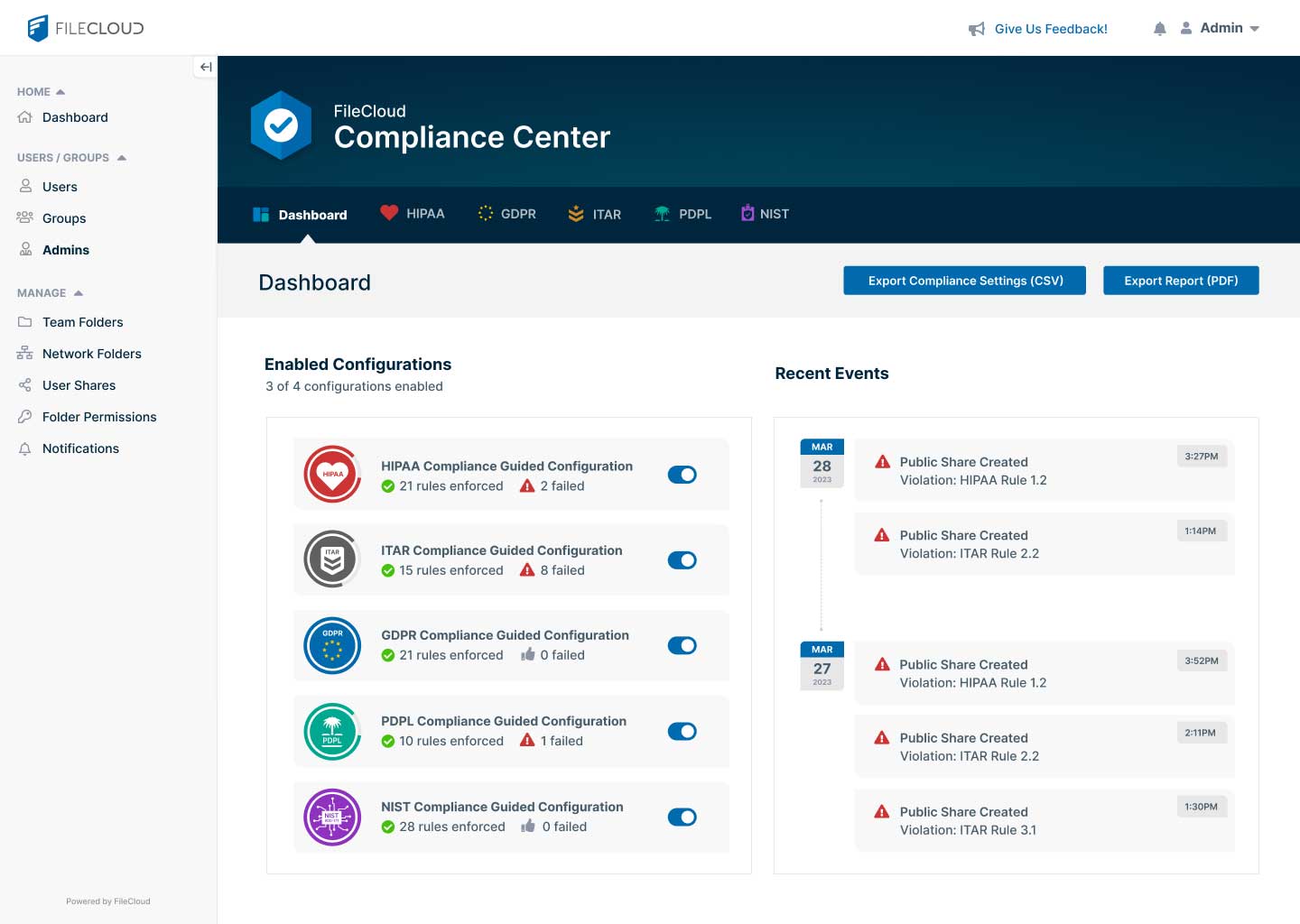
For government organizations that need to comply with GDPR, HIPAA, ITAR, or NIST 800-171, FileCloud offers the Compliance Center. In a streamlined dashboard, FileCloud connects complex requirements with FileCloud policies and settings that admins can implement with just a few clicks. Admins can also instantly view and resolve compliance issues.
Data Redundancy
FileCloud ServerLink supports data redundancy by replicating a FileCloud site to one or many locations. FileCloud offers complete data redundancy, disaster recovery, and business continuity capabilities for government enterprises. Even if one site goes down, users can always access the files from a different site.