Corporate Liability For Online File Sharing

Understanding the Implications of Corporate Liability for Online File Sharing

Get Free Trial
Client Logo
Client Logo
Client Logo
Client Logo
Client Logo

Defining Corporate Liability for Online File Sharing

Corporate Records

Terms of Services (ToS) & Service Level Agreements (SLA) are vital contracts defining responsibilities, expectations between file sharing companies and clients. They outline service commitments, uptime guarantees, data handling procedures & user obligations, critical for corporate liability in file sharing.

Indemnification

Indemnification is a contractual obligation where one party agrees to compensate another for any losses or damages incurred. In the context of online file sharing, it protects businesses from legal liabilities arising from misuse or breaches by ensuring the responsible party covers any resulting financial repercussions.

Limitation of Liability

Limitation of liability is a contractual provision that caps the amount one party must pay in the event of breach or harm. In the context of online file sharing, it restricts the financial exposure of companies, ensuring they aren’t excessively penalized for data breaches or service failures beyond a predefined limit.

Gartner Per Insights Logo 2018
Gartner Per Insights Logo 2019
Gartner Per Insights Logo 2020
Gartner Per Insights Logo 2021
Gartner Per Insights Logo 2022

FileCloud has received the Gartner Peer Insights Customers’ Choice Distinction for the fifth consecutive time!

92% of our customers would recommend us to a friend.

Rating Stars Image 4.6

Corporate Liability for Online File Sharing: Navigating a Complex Landscape

Corporate file sharing facilitates seamless collaboration, boosts productivity and enhances communication across various departments. Yet, as companies increasingly rely on digital solutions, it becomes imperative to understand the legal ramifications of file sharing.
A critical element of successful business operations involves navigating the challenges between corporate file sharing and compliance and security measures.

Online File Sharing Considerations for Enterprises

Businesses and enterprises must develop strategic approaches to address corporate liability while enabling online file sharing solutions. FileCloud enables these organizations to address critical considerations for file sharing:

  • Access controls
  • Data protection and sharing policies
  • Activity auditing and monitoring
  • Data governance and integrity
  • Risk assessment and mitigation
  • Regulatory compliance

Benefits of Using FileCloud for Secure Corporate File Sharing
FileCloud helps businesses address corporate liability related to online file sharing through a robust feature stack and hyper-secure environment.

Admin & User Sharing Controls

Admins can secure files and data by enabling encryption protocols, multi-factor authentication, user access controls and permissions, data leak prevention rules, content classification, and comprehensive audit trails.

FileCloud Admin Dashboard

Similarly, users are also empowered to secure data using granular file sharing tools. Users can create secure shares from any device at any time. The easy-to-use interface offers users the ability to send files with a variety of security options. These include private (internal) sharing, public sharing links, password-protection, Zero Trust File Sharing® (encrypted, password-protected container for files and folders), expiration dates on shares, granular access permissions (read, write, delete, share, manage, etc.), and download limits. Users can also streamline and automate repetitive file management tasks using the no-code workflow builder.
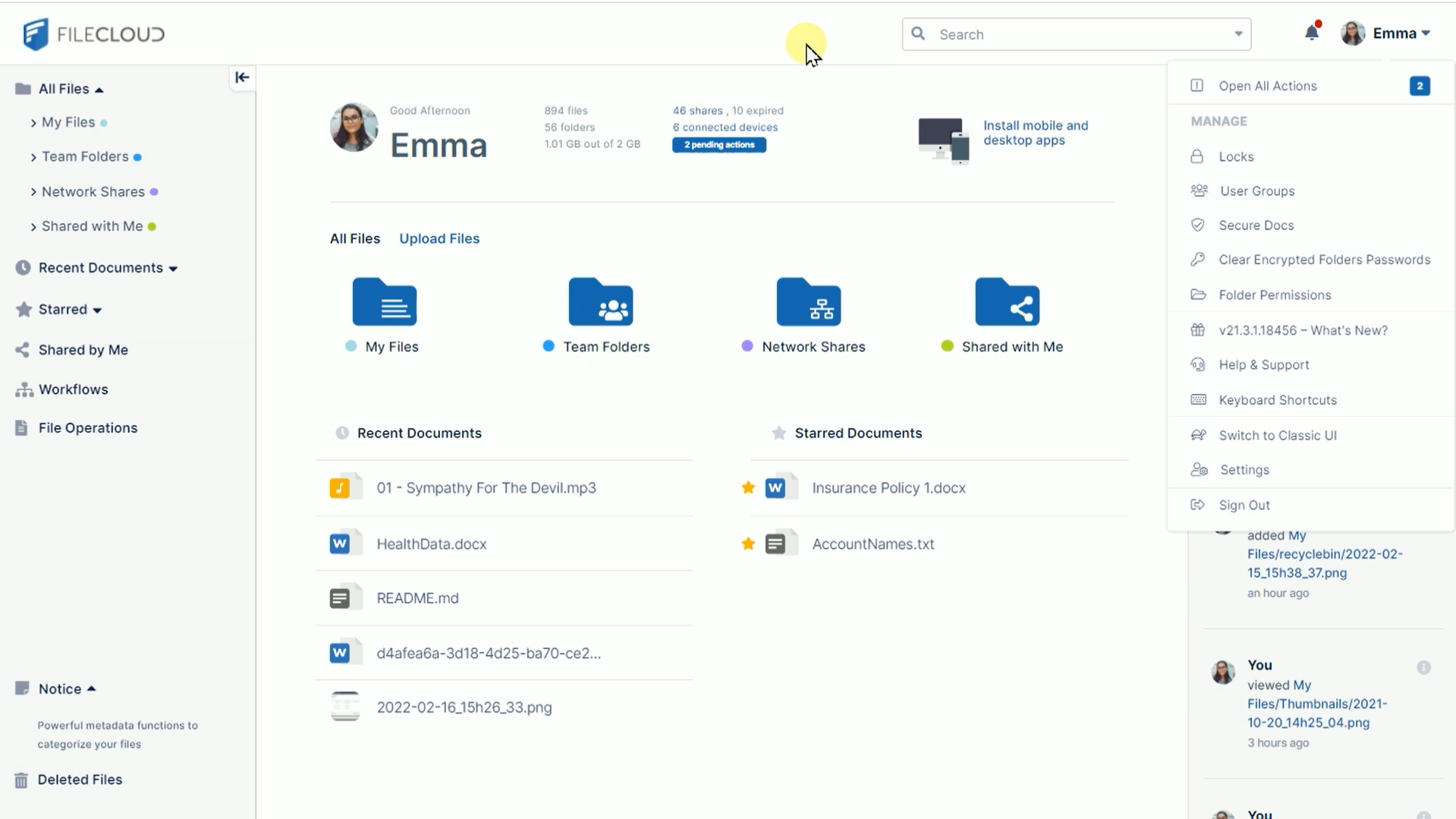
FileCloud User Dashboard

Collectively, these user and admin tools help minimize the risk of data breaches and legal liabilities associated with online file sharing activities.

Seamless Integration

FileCloud seamlessly integrates with existing business networks and IT infrastructure, ensuring smooth adoption and minimal disruption to operations. This integration capability allows for efficient data flow, collaboration, and file management across the organization.

Customizable Compliance Settings

Customizable compliance settings in FileCloud enable enterprises and organizations to tailor security and data protection measures according to specific regulatory requirements. This flexibility ensures that businesses can adapt FileCloud’s features to suit their unique compliance needs and industry standards.

FileCloud Supports Regulatory Compliance with File Sharing Requirements

By aligning with regulatory requirements like GDPR, HIPAA, and others, FileCloud minimizes the risk of data breaches and legal repercussions. This proactive approach not only safeguards corporate assets but also fosters trust and accountability, ensuring that online file sharing is conducted in a secure and compliant manner.
The Compliance Center provides a streamlined view of key regulatory requirements and matches them with FileCloud tools and settings. Admins can enable Compliance Center tabs for GDPR, HIPAA, ITAR, PDPL, and NIST 800-171.

10 FileCloud Features that Support Compliance with Corporate Liability Requirements for Online File Sharing

FileCloud’s compliance support tools, settings, and streamlined compliance dashboard provide enterprises with single-pane-of-glass management to help manage corporate liability of online file sharing.
FileCloud admins can enable a hyper-secure environment for file sharing that adheres to legal standards for sensitive data protection in 10 easy steps.

  1. Encrypt data at rest (AES 128- or 256-bit).
  2. Integrate an SSL certificate to secure data in transit.
  3. Create user and group policies for file access and sharing.
  4. Leverage role-based access controls (RBAC) to label managers and leads as “admin-users,” with the ability to manage file sharing among their teams.
  5. Establish Team Folders for collaborative online file sharing among internal users.
  6. Build data leak prevention (DLP) rules to restrict file sharing and notify admins based on explicit parameters.
  7. Set up retention policies (ensures data is retained according to industry or government regulations).
  8. Create automated workflows to streamline repetitive administrative processes.
  9. Generate audit logs for internal review and external audit processes.
  10. Enable relevant compliance tabs in the Compliance Center (GDPR, HIPAA, ITAR, PDPL, NIST 800-171).

Frequently Asked Questions (FAQs)

What is corporate liability for online file sharing?

Corporate liability refers to the legal responsibilities that businesses bear when sharing files online. This encompasses compliance with cybersecurity regulations and safeguarding against potential data breaches.

How can businesses reduce liability in file sharing?

Businesses can reduce liability in file sharing by employing secure and compliant solutions, such as FileCloud, and ensuring employees are well-versed in data protection practices.

Why is Compliance important in File Sharing?

Compliance is crucial in file sharing as it ensures adherence to laws and regulations, thereby minimizing the risk of legal penalties and bolstering the business's reputation.

What are the key Components of a File Sharing SLA?

A file sharing Service Level Agreement (SLA) should encompass service commitments, uptime guarantees, data handling protocols, and user obligations that effectively describe the responsibilities of the file sharing provider and the originating client.

What does indemnification mean in file sharing?

Indemnification in file sharing shields businesses from legal liabilities that arise due to the misuse of file sharing services. It provides a layer of protection against potential financial repercussions.

Worldwide

FileCloud
CodeLathe Technologies Inc.
dba FileCloud
125 Park Avenue FL 25
New York, NY 10017-5550

Fax: +1 (866) 824-9584

Europe

FileCloud Technologies Limited
Ducart Suite,
Castletroy Park Commercial Centre, Castletroy,
Limerick, Ireland


Copyright © FileCloud. All Rights Reserved.

Please select your country

SUBMIT