FileCloud’s Self-Hosted Cloud Storage & Server for Enterprise Teams

Get Free Trial →
Client Logo
Client Logo
Client Logo
Client Logo
Client Logo

Best Enterprise Self-Hosted Cloud Storage

Self-Hosted Cloud Storage

FileCloud delivers self-hosted cloud storage for enterprises, letting you deploy a secure self-hosted cloud server behind your corporate firewall or on AWS, Microsoft Azure, Windows, and Linux servers. Store, share, and sync files across devices from anywhere, with full access via any internet-connected device.

On-premise Storage

FileCloud provides enterprise private cloud storage and on-premises deployment, giving your business complete control over its data. Your self-hosted cloud storage server is accessed via LAN (local area network), keeping data within your own infrastructure without relying on third-party cloud hosting providers.

Data Security and Encryption

FileCloud protects your self-hosted cloud backup and file data with two layers of security: AES encryption and SSL/TLS tunnelling. Additional safeguards include antivirus protection, ransomware protection, and two-factor authentication — ensuring enterprise-grade security at every layer.

Gartner Per Insights Logo 2018
Gartner Per Insights Logo 2019
Gartner Per Insights Logo 2020
Gartner Per Insights Logo 2021
Gartner Per Insights Logo 2022

FileCloud has received the Gartner Peer Insights Customers’ Choice Distinction for the fifth consecutive time!

92% of our customers would recommend us to a friend.

Rating Stars Image 4.6

Self-Hosted Cloud Server Deployment - On Your Own Infrastructure

FileCloud can be deployed as a self-hosted cloud server on your organization’s own physical or virtual infrastructure. As a self-hosted cloud storage server, it runs on Windows and Linux environments, giving IT teams full control over configuration, access permissions, and data residency. Files are stored, shared, and synchronized entirely within your own network, with no data leaving your infrastructure unless you choose to extend it.

  • LAN-based access for fast local file retrieval across teams
  • Full administrator control over user permissions and access policies
  • Compliant with data residency and regulatory requirements by design
  • Customizable deployment to match existing IT environments

Enterprise Private Cloud Storage on AWS, Azure, or GCP

For organizations requiring cloud scalability without sacrificing control, FileCloud delivers enterprise private cloud storage on your preferred cloud environment: AWS, Microsoft Azure, or Google Cloud Platform. This self-hosted cloud storage model combines the flexibility of cloud infrastructure with the security and data sovereignty of a privately managed environment. Your data is never co-mingled with other tenants, and access is governed entirely by your own policies.

FileCloud also supports a hybrid deployment model, syncing your on-premises storage with a private cloud instance for remote access across distributed teams, without routing data through shared third-party infrastructure.

FileCloud deployment infographic

Self-Hosted Cloud Backup and Automated Data Protection

FileCloud’s self-hosted cloud backup capability ensures business continuity without relying on external backup vendors. Automated backup schedules protect organization data continuously, with deleted file recovery available at any point using FileCloud’s restore feature. Offsite backup synchronization adds a second layer of protection: if on-prem data is lost, your cloud backup remains intact and immediately restorable.

  • Automated backup scheduling with configurable retention policies
  • Deleted file recovery restores the most recent backed-up version instantly
  • Offsite backup sync between on-prem and cloud for redundancy
  • Audit logs track all data access and backup activity for compliance reporting

Enterprise Security, Encryption, and Compliance

FileCloud protects enterprise data at every layer. All files stored on your self-hosted cloud storage server are secured with AES 128- or 256-bit encryption and SSL/TLS tunnelling in transit. Two-factor authentication, antivirus scanning, and ransomware detection are built in, not bolted on. Unauthorized access attempts are flagged automatically, and all user activity is logged in a tamper-evident audit trail.

White Label File Sharing on Your Own Platform

FileCloud’s self-hosted file sharing platform can be fully white labelled, allowing organizations to deploy a branded file sharing experience for internal teams or external clients. Access permissions, sharing controls, and storage quotas are configured by administrators, ensuring data governance is maintained even as collaboration scales.
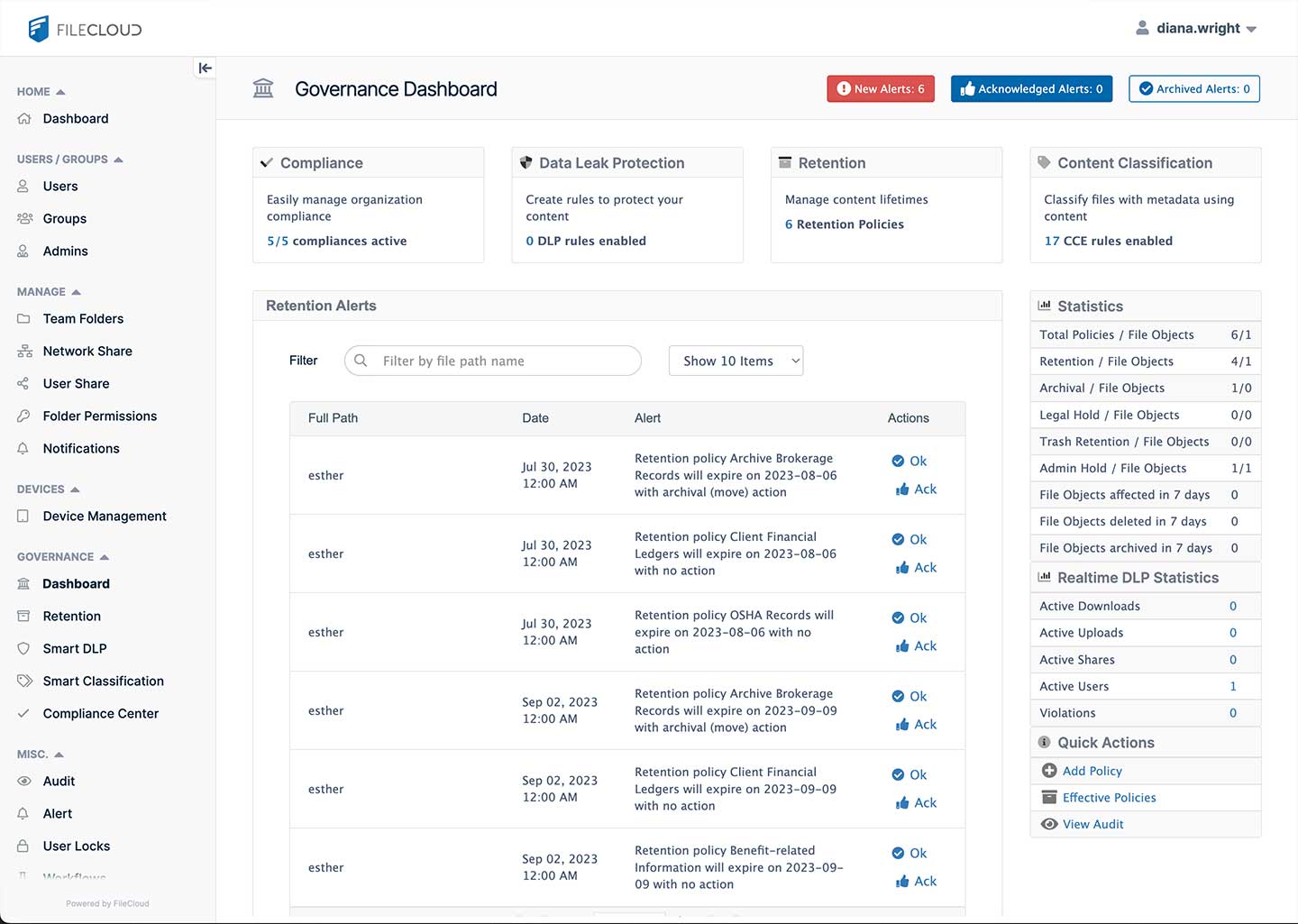
centralized data governance in FileCloud

Frequently Asked Questions (FAQs)

What is self-hosted cloud storage?

Self-hosted cloud storage is a file storage model where an organization hosts and manages its own cloud storage infrastructure, either via private on-premises servers or within a dedicated private cloud environment, rather than relying on a third-party provider such as Dropbox or SharePoint. This gives organizations full control over data security, access, and compliance.

What is a self-hosted cloud server?

A self-hosted cloud server is a server managed and operated by the organization itself, used to store, share, and back up files without routing data through an external cloud provider. FileCloud can be deployed as a self-hosted cloud server on Windows or Linux, within your own data center or on a private cloud instance.

How does FileCloud compare to traditional cloud storage for enterprises?

Unlike traditional cloud storage providers, FileCloud does not store your data on shared infrastructure. Every FileCloud deployment is dedicated to a single organization, ensuring data sovereignty, regulatory compliance, and a security posture that shared public cloud services cannot match.

Can FileCloud be deployed as both on-premise and private cloud?

Yes. FileCloud supports a hybrid deployment model. Your self-hosted cloud storage server can run on-premises for fast LAN-based access while simultaneously syncing to a private cloud instance on AWS or Azure for remote access and offsite backup redundancy.

Worldwide

FileCloud
CodeLathe Technologies Inc.
dba FileCloud
125 Park Avenue FL 25
New York, NY 10017-5550

Fax: +1 (866) 824-9584

Europe

FileCloud Technologies Limited
Ducart Suite,
Castletroy Park Commercial Centre, Castletroy,
Limerick, Ireland


Copyright © FileCloud. All Rights Reserved.

Please select your country

SUBMIT