9 Data Management Best Practices for Secure, Scalable Collaboration
Data management best practices for secure, scalable collaboration focus on balancing access, control, and compliance across an organization’s data lifecycle. From governance frameworks to automation and metadata classification, these practices ensure that data can be shared efficiently across teams and systems without compromising security, regulatory compliance, or operational agility.
1. Establish a Strong Data Governance Framework
Effective data governance begins with clarity: who owns the data, who can access it, and under what conditions. Organizations should implement classification tiers such as public, internal, confidential, and restricted and enforce them consistently.
Beyond ownership and access, good governance also includes policies for document versioning, naming conventions, and periodic review cycles. These measures ensure that data remains usable, trustworthy, and compliant across its lifecycle.
2. Prioritize Data Security at Every Layer
Data security should not be treated as a checkbox; it must be embedded into every layer of your architecture. This includes using encryption both in transit and at rest, enforcing strong authentication with multi-factor access controls, and ensuring permissions follow a principle of least privilege.
Adopting a Zero Trust approach where access is never assumed and always verified adds another layer of protection, especially when working with external collaborators or across distributed teams.
3. Embrace Data Lifecycle Management
Managing data effectively means knowing when it should be retained, archived, or deleted. Start by defining retention schedules based on data type and regulatory needs, for example, keeping financial records for seven years or HR documents for three. Implement automated workflows that move data through its lifecycle, applying policies for archival, deletion, or legal hold as needed. Proactive lifecycle management not only reduces storage costs but also minimizes exposure to compliance risks.

4. Enable Seamless Yet Controlled Collaboration
Enabling collaboration doesn’t mean sacrificing control. Users should be able to share files easily with internal teams or external partners, but with strict boundaries such as expiring links, password-protected access, or download restrictions. Real-time collaboration features like file syncing and commenting can improve productivity, but should be backed by robust audit trails and versioning to maintain integrity and traceability.
5. Leverage Metadata and Smart Classification
Organizing data goes beyond folder structures. Metadata, such as document type, department, or sensitivity level, provides the context needed for automation, governance, and searchability. Smart classification systems can automatically tag files upon upload or based on content rules, enabling precise control over how documents are retained, shared, or flagged for review. This structured approach reduces human error and supports more intelligent data management workflows.

6. Design for Flexibility and Data Sovereignty
Enterprises today operate across borders, with varying data residency requirements and infrastructure needs. A modern data management strategy should offer deployment flexibility, supporting cloud, on-premises, or hybrid environments, to meet compliance, cost, and performance goals. It should also enable each business unit, department, or geographic region to operate autonomously while maintaining centralized governance and policy enforcement.
7. Monitor and Audit Proactively
Visibility into data activity is critical for both security and compliance. Organizations should maintain comprehensive audit trails that log who accessed, edited, or shared files, and when. Real-time alerts for suspicious behavior, such as large data exports or multiple failed login attempts, can help detect threats early. Regular permission reviews are equally important to ensure that access levels remain appropriate as teams and roles evolve.
8. Automate Wherever Possible
Manual processes are not only inefficient, they are prone to error. Automating routine workflows like file approvals, access provisioning, or compliance checks can dramatically improve both speed and accuracy. For example, when a sensitive document is uploaded, a system could automatically classify it, set retention rules, and restrict access. These automated actions reduce operational overhead and help maintain compliance without constant oversight.

9. Integrate with Your Existing IT Ecosystem
Your data management platform should work in harmony with your broader tech stack. Integration with centralized identity and access management systems ensures consistent access control across environments. Support for single sign-on, file synchronization with cloud services, and APIs for custom workflows helps reduce friction and deliver seamless user experiences.
Ultimately, strong integration enables data to flow securely and efficiently wherever it is needed, without creating silos or duplication.
FileCloud’s Data Management Checklist can help jumpstart your organization’s data management strategy and strengthen your cybersecurity posture.
Download the Checklist
FileCloud for Data Storage, Classification, and Optimization
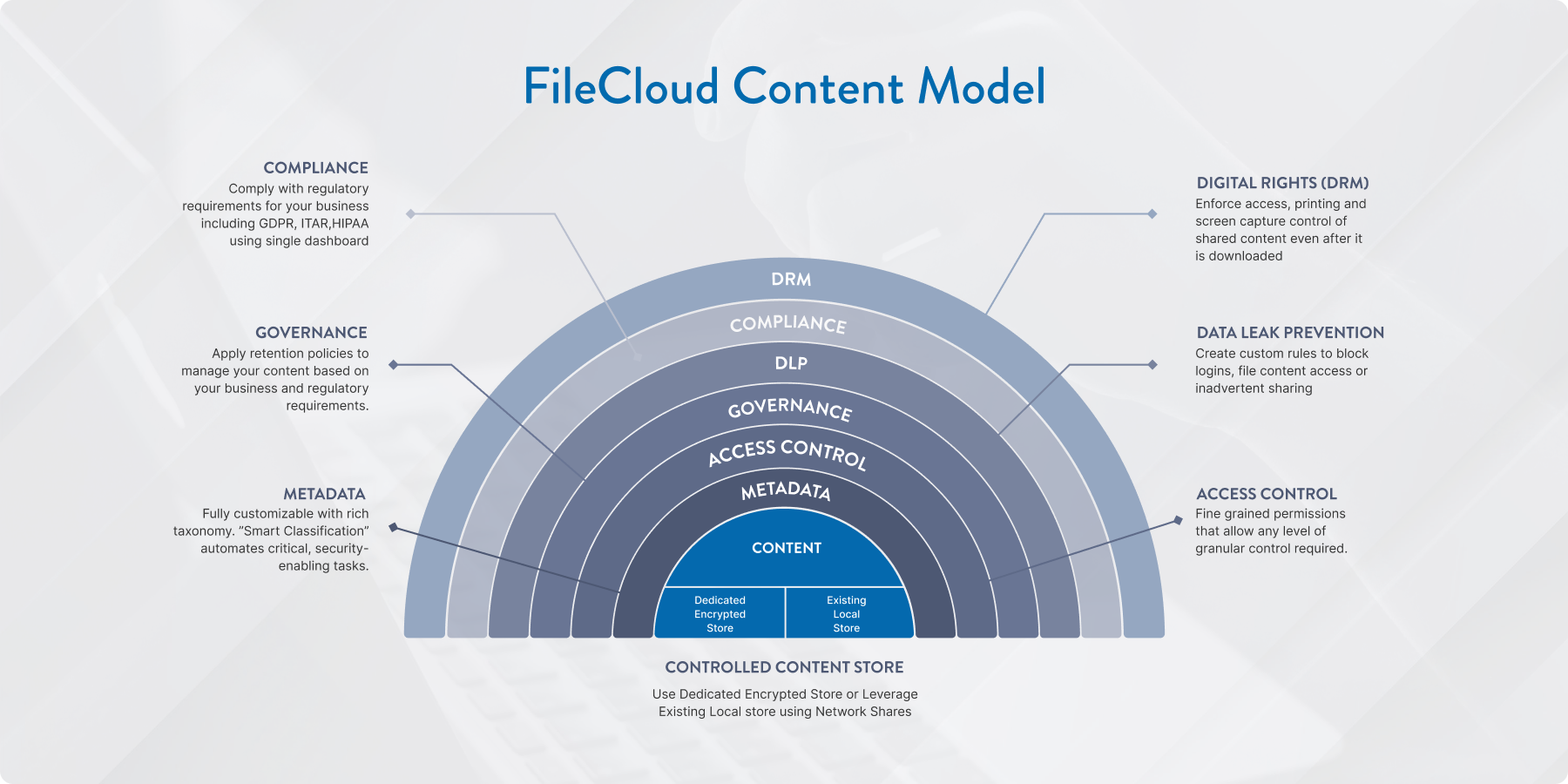
As organizations grow, putting best practices into action requires more than policy. It requires a platform that turns those practices into real-world workflows. FileCloud is purpose-built for secure collaboration, compliance, and operational efficiency. It gives teams the tools to manage data intelligently while meeting strict governance and security standards.
FileCloud Smart Classification Engine
FileCloud’s Smart Classification Engine automatically scans and classifies files based on predefined rules. This includes identifying patterns like credit card numbers, passport IDs, or HR-related content. Based on classification, FileCloud can instantly apply the right policies, such as retention, restricted access, or DLP enforcement. This helps teams stay compliant with frameworks like GDPR, HIPAA, and ITAR without needing to manually review every file.
Metadata Tagging for Findability and Context
FileCloud supports custom metadata schemas, making it easy to add structured context to any file. Teams can tag documents by project, department, sensitivity level, or any other relevant attribute. These tags power advanced search, dynamic access control, and automated workflows. Metadata also plays a critical role in retention and audit readiness by helping classify and track content across departments.
Optimizing Storage with FileCloud Desktop & Sync Tools
FileCloud includes sync clients and a virtual desktop that allow users to work with files without storing them locally. The sync client ensures files are always up to date across devices, while the desktop client provides real-time access to cloud-hosted files through a familiar file system interface. These tools reduce storage overhead, improve mobility, and make it easier for remote teams to stay connected to secure content.
Implement Zero Trust File Sharing® for External Collaboration
FileCloud offers Zero Trust File Sharing®, a security model that prevents unauthorized access even if files are shared outside the organization. Shared files are encrypted in secure zip folders, and the decryption password is never stored on the server. This means only the sender and intended recipient have access to the data. Permissions, expiration dates, and detailed audit trails give admins full control over how files are used, even after they leave the network.
Explore how FileCloud can support your data management strategy with a free trial or personalized demo. Start your trial or get in touch to speak with our team.

Product Marketing Manager