Post updated November 13, 2026.
AWS GovCloud provides isolated U.S. cloud regions designed for government agencies, contractors, and other organizations with elevated regulatory and security requirements. FileCloud can complement this infrastructure with secure file sharing, collaboration, administration, and data governance capabilities.
Organizations can choose from multiple FileCloud deployment models depending on how much infrastructure control they require and which federal security requirements apply to their environment.
AWS GovCloud for Sensitive Government Workloads
AWS GovCloud (US) consists of isolated U.S. regions designed to support sensitive and regulated workloads. AWS GovCloud can help organizations address requirements associated with frameworks and regulations including ITAR, EAR, FedRAMP, DoD Cloud Computing SRG, CJIS, IRS 1075, and FIPS 140-3.
For organizations that need secure file sharing and collaboration within government-focused cloud infrastructure (such as AWS GovCloud), FileCloud provides several deployment options.
Three Ways to Deploy FileCloud for Government Cloud Requirements
The right deployment depends on whether an organization wants to manage its own infrastructure, use a FileCloud-hosted SaaS environment, or requires a FedRAMP-certified cloud service.
FileCloud Server Self-Hosted on AWS GovCloud
Organizations that want direct control over their infrastructure can deploy FileCloud Server within their own, private AWS GovCloud environment.
In this model, the customer manages the AWS GovCloud infrastructure and FileCloud deployment while using FileCloud for secure file sharing, collaboration, access control, governance, auditing, and administration.
FileCloud Server is available as an Amazon Machine Image (AMI) and can be deployed within AWS infrastructure using standard AWS deployment and management tools.
This option can be appropriate for government agencies and contractors that want to maintain responsibility for their infrastructure architecture, storage, networking, security configuration, and associated compliance requirements.
FileCloud Online Hosted in GovCloud
Organizations that prefer SaaS can use FileCloud Online, where FileCloud hosts and manages the underlying FileCloud service.
GovCloud is available as a production hosting option for eligible FileCloud Online customers, providing organizations with a managed FileCloud environment while avoiding the infrastructure administration associated with a self-hosted FileCloud Server deployment.
Customers retain access to FileCloud collaboration, governance, security, and administrative capabilities while FileCloud manages the SaaS infrastructure.
FileCloud FedRAMP
For organizations that specifically require a FedRAMP-certified cloud environment, FileCloud FedRAMP is available through FedHIVE within a FedRAMP Certified, Class D (High) environment.
This option is intended for U.S. federal agencies and organizations that require a cloud service aligned with the former FedRAMP High baseline. FileCloud is included as a certified service within the FedHIVE environment, which provides the underlying FedRAMP security boundary and continuous monitoring framework.
FileCloud FedRAMP provides a managed SaaS option for organizations handling sensitive federal workloads that need the assurance associated with a FedRAMP Class D environment.
Understanding FIPS 140-3 and AWS GovCloud
FIPS 140-3 defines security requirements for cryptographic modules used to protect sensitive government information. AWS GovCloud provides infrastructure and services that support FIPS 140-3 requirements, including FIPS-enabled service endpoints and validated cryptographic modules.
However, deploying FileCloud within AWS GovCloud does not by itself make a FileCloud deployment FIPS 140-3 compliant.
FileCloud supports FIPS 140-3 through FIPS mode on supported deployments. FIPS mode requires the appropriate FileCloud license and configuration together with a supported FIPS-enabled operating system.
For self-hosted FileCloud Server customers, current FileCloud FIPS 140-3 support applies to qualifying Linux environments, including supported Ubuntu Pro and Red Hat Enterprise Linux deployments. (Organizations that require FIPS 140-3 should confirm the appropriate deployment, licensing, operating system, and configuration requirements.)
This distinction is important: AWS GovCloud provides government-focused cloud infrastructure, while FileCloud FIPS mode addresses the cryptographic requirements within the FileCloud application environment.
Secure File Sharing and Collaboration with FileCloud
Regardless of the deployment model, FileCloud provides capabilities designed to help government agencies and contractors securely manage and share sensitive information.
Centralized Administration and Collaboration
FileCloud provides centralized administration for users, files, sharing policies, devices, and security settings. Users can securely access and collaborate on files while administrators maintain visibility and control over how organizational information is accessed and shared.
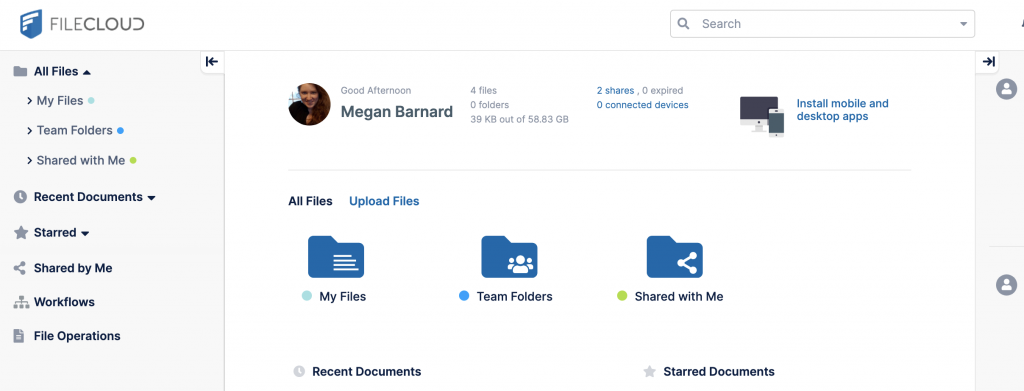
With FileCloud’s Workflow Automation any user can create workflows in minutes with a no-code, drag-and-drop design. These workflows can be created to automate tedious but important tasks like email reminders, document review, signoffs, and more.
Compliance & Governance
FileCloud provides governance and compliance capabilities that can help organizations implement controls associated with regulatory and security requirements.
Compliance Resource Library – FileCloud offers a resource library with white papers and configuration guides on various security and regulatory topics like CMMC, FINRA, SEC Rule 17a-4(f), and FIPS 140-2, among others.
Compliance Center – FileCloud’s Compliance Center offers separate tabs for HIPAA, GDPR, NIST 800-171, and ITAR compliance. These configurations connect regulatory requirements with FileCloud security tools and retention policies. The Compliance Center also offers recommendations and issues alerts in case of non-compliance, with audit trails for oversight purposes.

FileCloud also supports FIPS 140-3 on qualifying deployments, as described above. FIPS requirements should be evaluated separately from the choice of GovCloud or FedRAMP deployment.
Data Loss Prevention and Content Classification
FileCloud Smart DLP helps administrators control how sensitive information can be accessed, downloaded, or shared. Policies can evaluate contextual information such as users, groups, IP ranges, email domains, folder locations, metadata, and access methods before allowing or restricting an action.
Smart Content Classification complements DLP by helping organizations identify and categorize sensitive information such as personally identifiable information (PII), protected health information (PHI), and payment card information.
Together, these capabilities can help organizations apply appropriate controls to sensitive content at scale.
Retention and Records Governance
FileCloud provides retention and lifecycle controls for organizations that need to maintain, preserve, archive, or dispose of information according to defined policies.
- Admin Hold: Outranks all other policies and prevents any update or delete of digital content for an indefinite period of time.
- Legal Hold: Freezes digital content to aid discovery or legal challenges. During a legal hold, file modifications are not allowed.
- Retention: Identifies digital content to be kept around for an unlimited amount of time before being deleted or released.
- Archival: Moves and stores old organizational content for long term. No Deletion is allowed until a specified time period is reached. After this time, content gets moved to a specific folder.
- Trash Retention: Can be configured for automatic and permanent deletion of all files in the Trash bins or to expire with no actions.
These capabilities help organizations manage content according to business, legal, and regulatory requirements while maintaining auditable governance processes.

Zero Trust File Sharing®:
Following the security model established by the US Department of Defense and adopted by the National Security Agency, FileCloud offers Zero Trust solutions across the “7 Pillars of Zero Trust.”
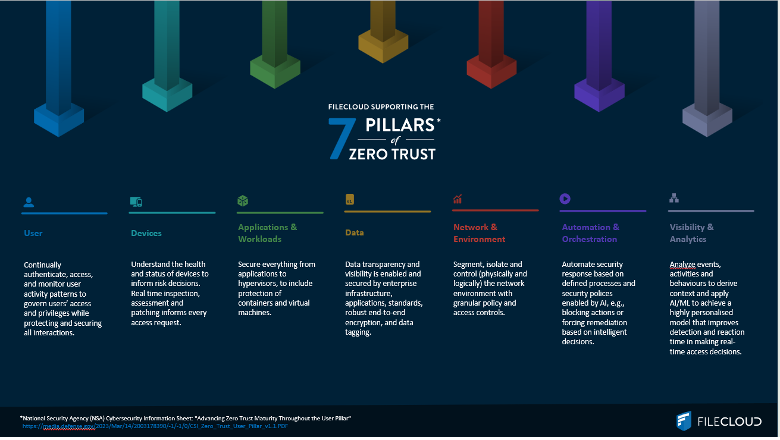
Users can share files and folders with Zero Trust protection in their FileCloud Managed (local) storage. Zero Trust files can be shared with read-only (preview, download) or read-write (preview, download, add, delete) permissions.
Enable Zero Trust File Sharing® by creating Zip files in FileCloud and adding password-protection. The decryption key is not stored within the FileCloud system, so you retain exclusive control and visibility over your data. Zip files are not scanned or read by FileCloud. New Zip files with password-protection (Zero Trust) are secured in FileCloud with 256-bit AES encryption and granular sharing permissions.
Branding and User Experience
Organizations can also customize the FileCloud experience with logos, imagery, colors, custom CSS, and custom domains, whether deploying in a self-hosted environment or as a SaaS solution.
This enables agencies and contractors to provide a familiar user experience for employees, partners, and external collaborators while maintaining centralized control over the underlying file sharing environment.
Choosing the Right FileCloud Government Deployment
“The security is easily the best. It’s nice knowing that what you are sending is secure and at the same time is compliant with all the DoD-related restrictions that we face.” –G2 Verified User, Defense and Space
AWS GovCloud is a powerful cloud environment that can be paired with FileCloud in several ways to suit U.S. government and defense contractor infrastructure and data sovereignty requirements.
The result is greater flexibility for government agencies and contractors to select the deployment model that aligns with their infrastructure, security, compliance, and operational requirements.
Ready to explore FileCloud and AWS GovCloud for your organization?
Schedule a custom demo today →

Content Marketing Strategist