Navigating HIPAA cloud storage requirements is essential for any organization handling sensitive medical data in the digital age. As healthcare providers shift away from physical servers, the cloud offers scalability and efficiency, but it also introduces unique compliance challenges. To remain compliant with the Health Insurance Portability and Accountability Act (HIPAA), organizations must ensure that their cloud service providers (CSPs) adhere to strict administrative, physical, and technical safeguards.
This guide breaks down the essential rules that govern how Protected Health Information (PHI) is stored and transmitted. Whether you are a covered entity or a business associate, understanding these standards is the first step toward avoiding costly penalties and protecting patient trust. By implementing the right encryption, access controls, and legal agreements, you can leverage the power of the cloud without compromising data integrity or legal standing.
Understanding HIPAA in the Cloud
In a cloud environment, HIPAA compliance is a shared responsibility. While traditional on-premise storage allows for total control, cloud storage involves a third-party provider managing the infrastructure. HIPAA’s relevance here centers on ensuring that this third party maintains the same level of data protection as the healthcare provider itself.
The core of “HIPAA in the cloud” is the Business Associate Agreement (BAA). Without this signed contract, a cloud provider cannot legally store PHI, regardless of how secure their technology is. Furthermore, organizations must recognize that using a “HIPAA-compliant” provider does not automatically make the organization compliant; the user must configure the settings—such as multi-factor authentication and audit logging—to meet federal standards. Understanding this distinction is vital for maintaining a secure and compliant digital ecosystem.
The Privacy Rule
The HIPAA Privacy Rule establishes national standards to protect individuals’ medical records and other personal health information. It applies to health plans, healthcare clearinghouses, and those healthcare providers that conduct certain healthcare transactions electronically. In the context of cloud storage, the Privacy Rule dictates who has the right to access PHI and under what circumstances it can be disclosed.
A key component is the “Minimum Necessary” standard, which requires covered entities to take reasonable steps to limit the use or disclosure of PHI to the minimum amount necessary to accomplish the intended purpose. When choosing a cloud storage solution, you must ensure the platform supports granular permission settings. This allows you to restrict data access to authorized personnel only, ensuring that patient privacy is upheld even when data is stored off-site.
The Security Rule
While the Privacy Rule covers all PHI, the HIPAA Security Rule specifically focuses on Electronic Protected Health Information (ePHI). This rule is the technical backbone of cloud compliance, outlining the safeguards necessary to protect data at rest and in transit. It is categorized into three main pillars:
- Administrative Safeguards: Policies and procedures that show how the entity will comply with the act.
- Physical Safeguards: Controlling physical access to data centers and hardware.
- Technical Safeguards: Using technology like encryption, unique user IDs, and automatic log-offs to protect data.
For cloud storage, encryption is non-negotiable. You must ensure your provider uses high-level encryption (such as AES-256) to render ePHI unreadable to unauthorized users. Regularly reviewing these safeguards is a requirement to mitigate evolving cybersecurity threats.
The Breach Notification Rule
The Breach Notification Rule requires HIPAA-covered entities and their business associates to provide notification following a breach of unsecured PHI. A breach is generally defined as an impermissible use or disclosure under the Privacy Rule that compromises the security or privacy of the protected information.
If a cloud storage provider experiences a data leak, they must notify the covered entity. In turn, the entity must notify the affected individuals, the Health and Human Services (HHS), and, in some cases, the media. Notifications must be sent without unreasonable delay and no later than 60 days following the discovery of the breach.
To stay compliant, your cloud storage contract should clearly define the timeline and process for reporting incidents, ensuring you can react swiftly to mitigate damage and meet legal deadlines.
The Enforcement Rule
The HIPAA Enforcement Rule contains provisions relating to compliance and investigations, as well as the imposition of civil money penalties for violations. It gives the Office for Civil Rights the authority to investigate complaints and conduct compliance reviews.
Penalties are structured based on the level of “willful neglect.” They can range from $100 to over $50,000 per violation, with a maximum annual penalty of $1.5 million for repeated violations. In the cloud, the Enforcement Rule serves as a reminder that ignorance is not a defense.
If an organization fails to sign a BAA or leaves a cloud bucket publicly accessible, they are liable for significant fines. Regular audits and a proactive approach to security are the best defenses against the strict oversight of the Enforcement Rule.
HIPAA Compliance Checklist
Before moving data to the cloud, use this HIPAA compliance checklist to evaluate your storage provider and internal processes:
- Execute a BAA: Ensure the provider will sign a Business Associate Agreement.
- End-to-End Encryption: Verify that data is encrypted both at rest and in transit.
- Access Controls: Implement unique user IDs, strong passwords, and multi-factor authentication (MFA).
- Audit Logs: Ensure the system tracks who accesses PHI and when.
- Data Backups: Maintain a frequent, encrypted backup schedule to ensure data availability.
- Integrity Controls: Use tools to ensure PHI isn’t altered or deleted by unauthorized parties.
- Automatic Log-off: Configure sessions to expire after periods of inactivity.
Following this checklist ensures that you aren’t just buying “secure” storage, but actually configuring it to meet federal standards.
How to Stay Compliant and Avoid HIPAA Cloud Storage Penalties
Staying compliant is an ongoing process, not a one-time setup. To avoid HIPAA cloud storage penalties, organizations must move beyond basic storage and adopt platforms designed for governance. A specialized solution like FileCloud is highly effective here; its built-in HIPAA Compliance Center provides an intuitive dashboard to map technical controls directly to regulatory requirements, making it easier to identify and fix configuration gaps before an audit occurs.
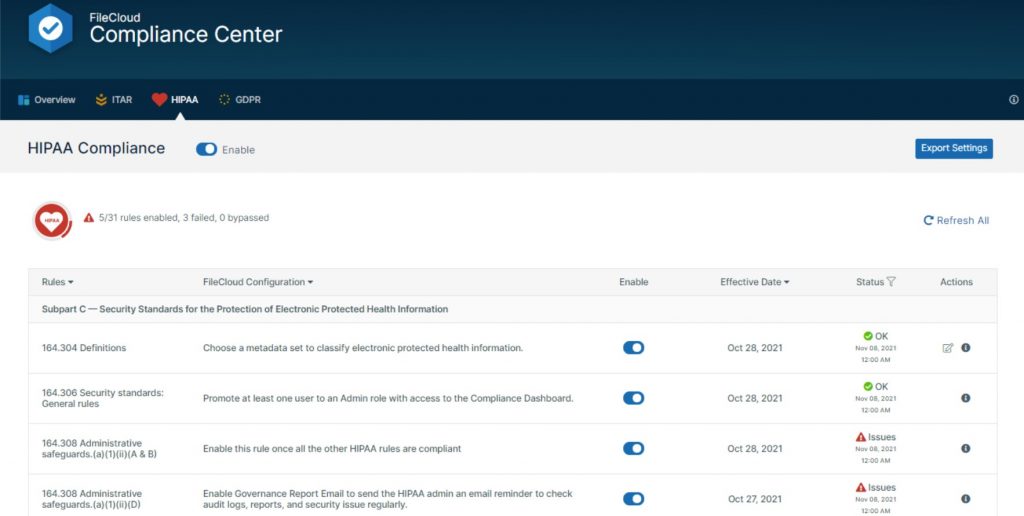
Leveraging FileCloud’s automated audit logs and Smart DLP (Data Leak Prevention) further mitigates risk by tracking every file action and preventing unauthorized sharing in real-time. By maintaining this proactive “paper trail” and utilizing advanced compliance tools, you significantly reduce the risk of costly fines and reputational damage
HIPAA Cloud Compliance FAQs
What is HIPAA-compliant cloud storage?
HIPAA-compliant cloud storage refers to cloud services that meet the privacy and security requirements of the Health Insurance Portability and Accountability Act for storing protected health information (PHI).
What makes cloud storage HIPAA compliant?
To be HIPAA compliant, cloud storage must include encryption, access controls, audit logging, secure data transmission, and a signed Business Associate Agreement (BAA) with the service provider.
Is there such a thing as HIPAA-approved cloud storage?
The U.S. Department of Health and Human Services (HHS) does not “approve” specific providers, but cloud services can be considered HIPAA-compliant if they meet all required standards and sign a BAA.
What are the key HIPAA requirements for data storage?
HIPAA requires that data storage solutions protect PHI with administrative, physical, and technical safeguards, including access controls, encryption, audit logs, and backup protocols.
Do all cloud storage providers offer HIPAA compliance?
No. Not all cloud providers offer the necessary features or BAAs. Always verify HIPAA compliance and request a BAA before storing PHI.
Can medical records be stored in the cloud under HIPAA?
Yes, medical records can be stored in the cloud if the storage system complies with HIPAA requirements and ensures the confidentiality, integrity, and availability of PHI.
How do I know if a storage solution is HIPAA compliant?
A HIPAA-compliant storage solution should offer strong security controls, HIPAA-aligned policies, and a willingness to sign a BAA with your organization.
What are the penalties for non-compliant HIPAA data storage?
HIPAA violations related to data storage can result in fines ranging from $100 to $50,000 per violation, with an annual maximum of $1.5 million, depending on the severity and cause.

Content Marketing Strategist