Secure Client Portal Software for Document Sharing

Hyper-Secure, Fully Branded Document Portal

Get Free Trial →
Client Logo
Client Logo
Client Logo
Client Logo
Client Logo
Client Logo

Corporate Document Portal for Businesses and Enterprises

Branded Client Document Portal

FileCloud offers a hyper-secure client document portal for file sharing, which can be created in minutes. Enterprises can run FileCloud under their own business domain, with their logos, colors, and messages. Enterprises will also get unlimited free client/partner accounts

Secure Document Portal

With FileCloud you get maximum protection from email spoofing and ransomware attacks. FileCloud security includes 256-bit AES SSL encryption at Rest, two-factor authentication, anti-virus scanning, a recycle bin, and endpoint device protection.

Powerful File Sharing

FileCloud offers powerful file-sharing features that include public, private and time-limited shares. FileCloud also comes with fine-grained audit logs, file change email notifications and many more features making it a perfect document portal for clients.

Gartner Per Insights Logo 2018
Gartner Per Insights Logo 2019
Gartner Per Insights Logo 2020
Gartner Per Insights Logo 2021
Gartner Per Insights Logo 2022

FileCloud has received the Gartner Peer Insights Customers’ Choice Distinction for the fifth consecutive time!

92% of our customers would recommend us to a friend.

Rating Stars Image 4.6

Access Your Client Portal From Anywhere in the World

The FileCloud document portal facilitates hyper-secure entry to your critical data, enabling streamlined file management from any location. This flexible client document portal is accessible across desktops, laptops, and mobile devices, requiring only a standard internet connection for full functionality. Distributing files and folders to internal teams or external partners is exceptionally efficient using FileCloud’s intuitive document sharing portal.

Secure online document sharing safeguards confidential materials via robust encryption and granular access permissions, fostering protected collaboration. This platform delivers a dependable architecture for exchanging assets without jeopardizing corporate data integrity. By sharing documents securely, organizations can seamlessly collaborate on high-stakes files while retaining absolute authority over user permissions and operational workflows.
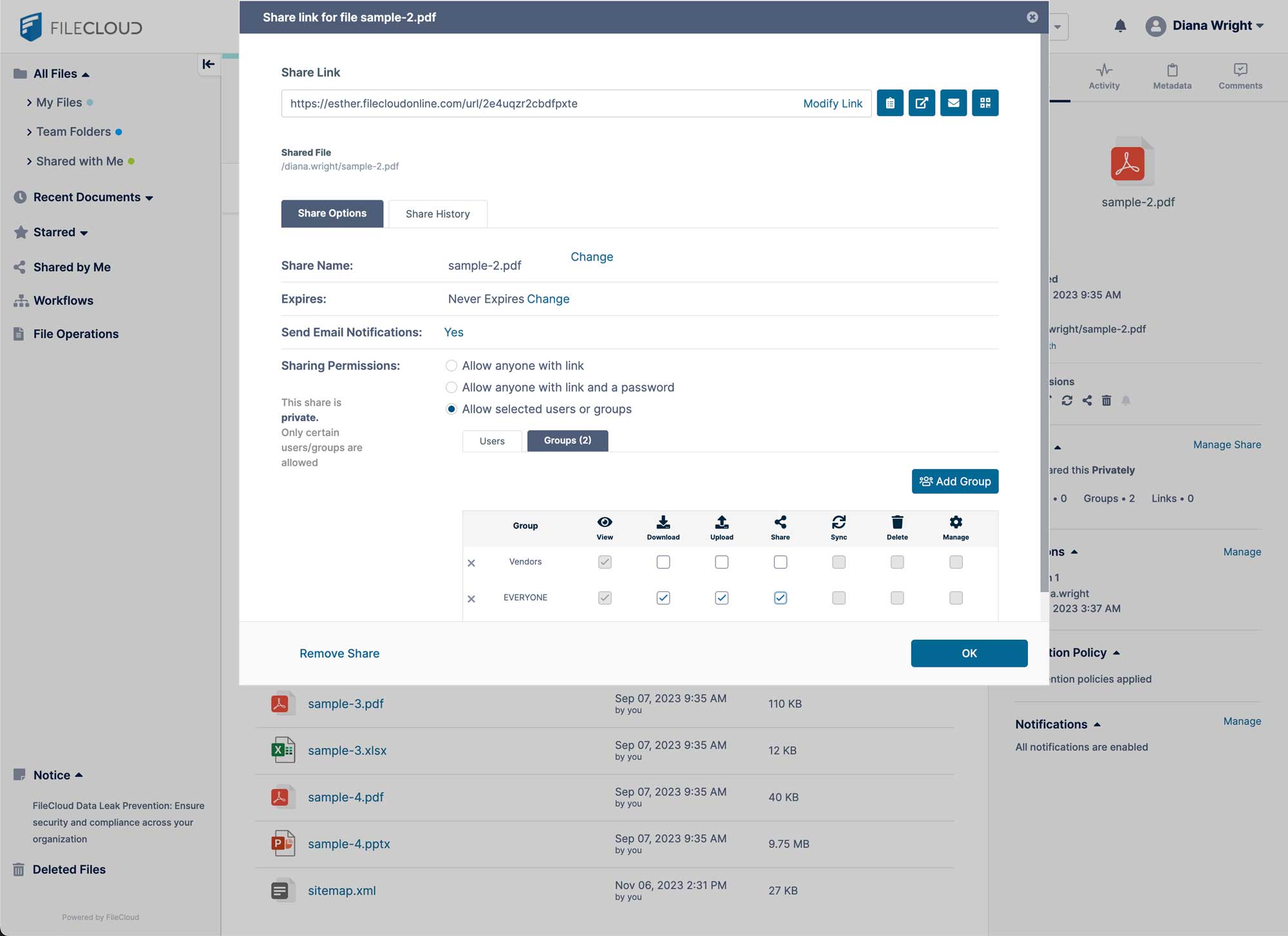
FileCloud secure document portal file sharing

Secure Client Upload Portal

The FileCloud client document portal enhances operational performance by streamlining how users upload, organize, and protect assets shared with external stakeholders and internal staff. By integrating advanced security—including intelligent data leak prevention, comprehensive audit trails, and robust endpoint management—administrators can confidently prevent data breaches and eliminate unvetted file distribution across the enterprise.

This flexible secure document portal is accessible via any modern browser or mobile platform, requiring only a standard network connection for full functionality. FileCloud delivers a high-integrity environment for information exchange, utilizing encryption to ensure the absolute privacy of your most confidential corporate records.

FileCloud’s client file sharing portal provides a dependable, encrypted architecture for the high-velocity transfer of sensitive materials. Through granular permissions and tailored access controls, organizations can balance rigorous data protection, seamless multi-user collaboration, and strict regulatory compliance.
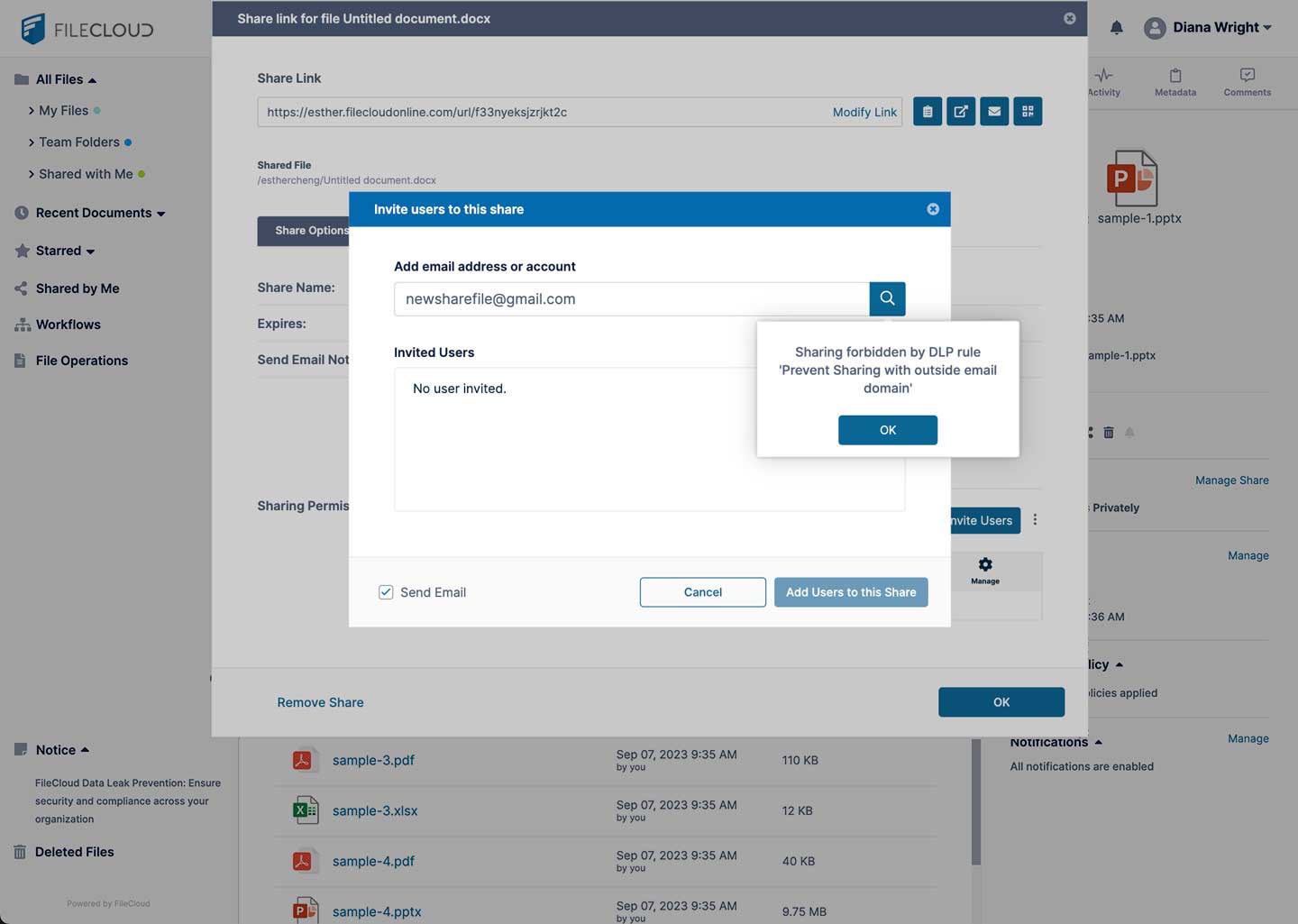
FileCloud Data Leak Prevention DLP

Branded Client Portal for File Sharing

A client portal for file sharing should make it easy to exchange files without compromising security or creating unnecessary barriers for external users. FileCloud simplifies client collaboration by providing unlimited free client accounts, allowing customers, partners, and vendors to securely access shared files without additional licensing costs.

Organizations can customize their document portal with their own business domain, and apply logos and languages to features like headers, platform messaging, email notifications, and terms of service, which ensures consistent brand visibility.

Public and private sharing options give organizations complete control over how content is distributed, while support for large file transfers makes it easy to send videos, CAD files, design assets, and other oversized documents.

With FileCloud, businesses can securely share files, streamline collaboration, and deliver a seamless client experience from a single portal.

Built for Enterprises and Governments

Built for enterprises, governments, and professional services, FileCloud’s secure client portal solution offers a robust document management and secure file sharing solution for security, reliability, and scalability.

Easily create a client portal in minutes, send documents instantly and securely via the document portal while getting automated notifications, a centralized dashboard for all file analytics, and anytime anywhere access.

What Makes Our Client Portal Software Different?

Unlike many client portal solutions that are SaaS-only or designed primarily for simple file exchange, FileCloud gives organizations deployment flexibility without sacrificing enterprise capabilities.

Businesses can choose self-hosted, customer-managed cloud, hybrid, or FileCloud-hosted deployments while integrating with existing infrastructure such as Active Directory/LDAP, NTFS permissions, network file shares, S3-compatible storage, Microsoft 365, and Outlook.

FileCloud Benefits:

  • branded client portals
  • unlimited external client accounts
  • browser and mobile access
  • file sync and versioning
  • intuitive UX for securely sharing, reviewing, and uploading documents

A Hyper-Secure Document Sharing Portal

A secure document sharing portal must do more than provide access to files—it must protect sensitive information at every stage. FileCloud delivers a hyper-secure document sharing portal with AES-encryption for data at rest and TLS encryption for data in transit, helping safeguard files against unauthorized access.

Multi-factor authentication (MFA) adds an additional layer of identity verification, while endpoint protection features such as remote device wipe and device management help secure data on desktops and mobile devices.

Granular permissions allow administrators to precisely control who can view, edit, download, share, or delete files, ensuring confidential documents remain accessible only to authorized users.

FIleCloud Compliance Center

Leverage powerful tools inside FileCloud to stay in compliance with industry and government regulations.

FileCloud’s Compliance Center provides separate tabs for ITAR, GDPR and HIPAA, with additional support for regulations like PDPL and CMMC.

The Compliance Center connects complicated regulations with the security tools and content governance features FileCloud provides like data governance, retention policies, and Smart Classification.

Administrators and compliance officers can easily see all policies and rules in place within The Compliance Center and get reports on any violations so teams can quickly address any issues.

Frequently Asked Questions (FAQs)

What is client portal software?

Client portal software provides a secure online workspace where businesses can share files, communicate, and collaborate with clients. Unlike email, a client portal centralizes documents, conversations, and permissions in one place, making it easier to exchange sensitive information while maintaining security, visibility, and version control.

What features should a secure client portal include?

A secure client portal should protect sensitive information with AES encryption, multi-factor authentication (MFA), granular user permissions, secure file sharing, audit logs, and endpoint protection. These features help ensure only authorized users can access client information while maintaining compliance with security and privacy requirements.

Why use a client portal instead of email?

Email wasn't designed for secure document sharing. Attachments can be difficult to track, file versions become fragmented, and sensitive information may be exposed. A client portal provides a centralized location where clients can securely upload, download, and collaborate on documents while giving administrators complete visibility and control over access.

How can clients securely upload and receive documents?

Clients can securely upload and receive documents through a client portal using encrypted connections, authenticated logins, and role-based permissions. FileCloud protects files both in transit and at rest, allowing organizations to securely exchange contracts, financial records, legal documents, healthcare information, and other confidential files.

Can I upload and share large files with clients?

Yes. Client portal software makes it easy to securely share large files that exceed email attachment limits. FileCloud supports large file transfers while allowing organizations to control access through password protection, expiration dates, public or private sharing links, and detailed permissions.

Can external clients access a client portal without a paid license?

Yes. FileCloud allows organizations to invite unlimited free client users, enabling customers, partners, vendors, and contractors to securely access shared files without requiring additional client licenses. This makes it easy to collaborate externally while maintaining enterprise-grade security and administrative control.

Worldwide

FileCloud
CodeLathe Technologies Inc.
dba FileCloud
125 Park Avenue FL 25
New York, NY 10017-5550

Fax: +1 (866) 824-9584

Europe

FileCloud Technologies Limited
Ducart Suite,
Castletroy Park Commercial Centre, Castletroy,
Limerick, Ireland


Copyright © FileCloud. All Rights Reserved.

Please select your country

SUBMIT